 costed plate
Define the category before calculating
Menu engineering compares items that belong to the same decision context. Start with a menu category and a sales period. Main dishes, drinks and desserts can have different buying occasions and price structures, so combining them indiscriminately can produce classifications that answer little about the menu.
Include offered items that belong in the category even when their sales are zero, but record periods when an item was unavailable. Exclude prep-only sauces, doughs and other sub-recipes that guests cannot order. Those components affect portion cost; they are not independent choices in the sales mix.
The classic method associated with Kasavana and Smith in 1982 combines popularity with contribution. Michael Kasavana's own explanation of the method confirms the popularity threshold and the sales-weighted contribution calculation used here. The classification is relative to the selected group, not an absolute rating of a dish.
Gather matching inputs
For each menu item, record units sold, net selling price and current ingredient cost per served portion. Use a consistent sales period and tax basis. If a price or recipe changed within the period, decide how the analysis represents that change and label the choice.
A count of orders is not necessarily a count of identical recipe portions. Modifiers, sizes, bundles and substitutions can change ingredient usage. Map the sales definition to the recipe definition before interpreting the result.
The app uses ingredient-level contribution: selling price less portion ingredient cost. It does not subtract every variable expense or allocate all labor and overhead to the item. Keep that boundary attached to the chart so the contribution axis is not mistaken for net profit.
Calculate popularity
Divide an item's units sold by total category units sold and multiply by 100. Equal popularity would be 100% divided by the number of offered items. The method's cutoff is 70% of that equal share, equivalent to 70 divided by the number of items when expressed in percentage points.
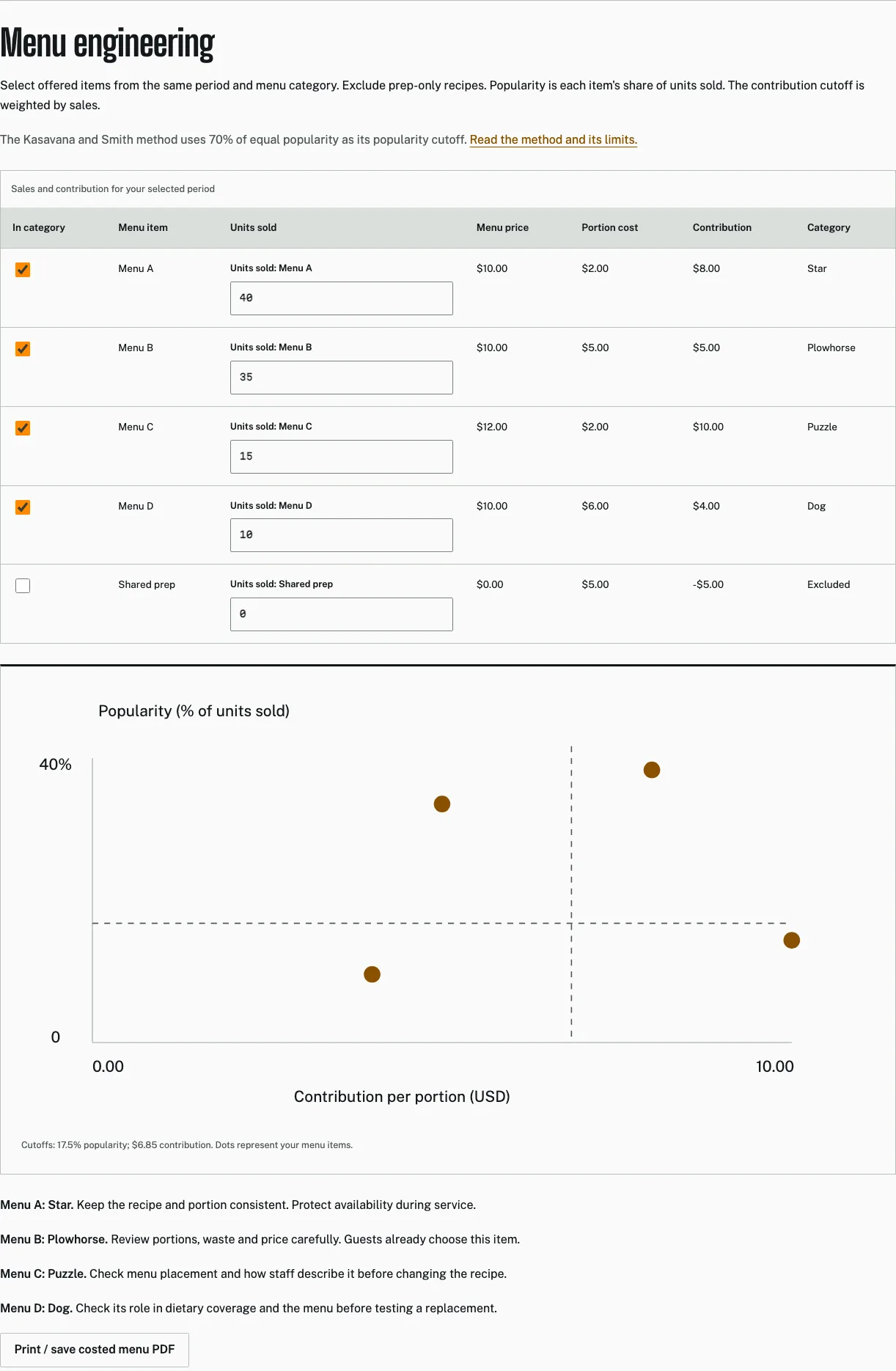
For an illustrative category of four items, equal popularity is 25% and the cutoff is 17.5%. Those counts are example inputs. The 70% factor is the cited method, not an estimated demand threshold invented for the example.
If no items sold, there is no meaningful popularity distribution. The app shows an explanatory message instead of assigning quadrants to a zero-sales menu. Enter an appropriate period before interpreting the chart.
Calculate the contribution cutoff
For each item, multiply contribution per portion by units sold. Add those contributions and divide by total units sold. This is the sales-weighted average contribution per item sold. A simple average of the menu's item contributions would answer a different question.
The following original example is chosen to show the calculation. Costs, prices and sales counts are assumptions, not observed restaurant data.
| Item | Contribution per portion | Units sold | Total contribution | Popularity |
|---|---|---|---|---|
| A | $8 | 40 | $320 | 40% |
| B | $5 | 35 | $175 | 35% |
| C | $10 | 15 | $150 | 15% |
| D | $4 | 10 | $40 | 10% |
Total units are 100 and total contribution is $685, so the contribution cutoff is $6.85. Popularity cutoff remains 17.5% because the offered category has four items. A and B are above the popularity cutoff; A and C are above the contribution cutoff.
Read the quadrants as prompts
| Quadrant | Relative popularity | Relative contribution | Example item |
|---|---|---|---|
| Star | High | High | A |
| Plowhorse | High | Low | B |
| Puzzle | Low | High | C |
| Dog | Low | Low | D |
A Star deserves attention to consistency and availability. It contributes well within the selected group and is frequently chosen. Protecting the recipe standard can matter more than making an unnecessary change to an item already doing its intended job.
A Plowhorse is already popular. Review portion control, waste, purchase specification and price carefully. A change that damages demand can remove the strength that made it worth examining in the first place. Model the dollar effect and test the guest response.
A Puzzle has relatively high contribution but lower observed popularity. Check description, placement, availability and staff familiarity. Do not assume that changing ingredients is the first solution when the issue may be how the item is presented or when it is offered.
A Dog is a review candidate, not an automatic deletion. It may support dietary choice, a group purchase or a particular service need. Check whether its operational role justifies keeping it and whether a replacement would improve the complete menu.
Check the limits before acting
The result depends on the selected group. Adding or removing an offered item changes the equal-popularity threshold. Changing the period changes the sales weights. A classification can move even when the recipe itself is unchanged.
Ingredient-level contribution also omits production constraints. A dish that consumes a scarce station during peak service may affect total throughput. Consider the actual workflow and paid work before promoting an item solely because it sits in a favorable quadrant.
Availability can distort observed popularity. If a dish was sold out or temporarily removed, low sales do not necessarily mean low guest preference. Annotate that condition and choose a period that supports the decision rather than treating the chart as context-free evidence.
Run the analysis in the ledger
Keep the menu recipes and prep recipes clearly named. In Menu engineering, select the items offered in the category and enter units sold for the same period. Review the table as well as the plot; the exact costs and classifications should remain inspectable.
Use price impact before applying an ingredient-price change, then review the affected contributions. A new selling price or portion can move the item's contribution while sales counts still describe the old period. Label that as a scenario rather than an observed new menu result.
Print the costed menu when you need a review copy, and export the ledger before major changes. The app does not import POS sales automatically, so maintaining the count input is part of the workflow.
Test a decision and revisit it
Choose a specific action for a specific item and state the expected effect. Keep the initial period, recipe and price available. After the test, compare sales, availability and contribution under similar conditions and record what changed.
Open the menu workspace to run the calculation. Use the contribution calculator to check an individual item and the menu-pricing guide to assess a proposed price. The method organizes the evidence; the operating decision still belongs to the people running the menu.
Use consistent boundaries at the cutoff
The app classifies an item at a cutoff as belonging to the high side of that measure. That convention makes ties reproducible. A tiny difference around a threshold should not be given more operational meaning than the quality of the inputs supports. Review the underlying dollars and counts, especially when an item sits close to a boundary. A quadrant label is a compact description of the calculation, not evidence that a small rounding movement changes the item’s role in the business.
Questions from the kitchen
Do prep recipes belong in the chart?
No. Include offered menu items in the selected category. Exclude prep-only components that guests cannot order.
Is a Dog automatically removed?
No. Check dietary coverage, availability, guest choice and operational role before testing a change.
What if nothing sold?
There is no meaningful popularity distribution. Enter an appropriate sales period before interpreting quadrants.
Sources and method
Checked October 29, 2026. Example inputs and computed results are identified in the text.
- The Power of Menu Engineering, Part One. Michael L. Kasavana / AHLEI. Author explains contribution margin, menu mix and the 1982 method. No third-party chart or prose reproduced. Checked 2026-10-29.
- The Power of Menu Engineering, Part Two. Michael L. Kasavana / AHLEI. Original author confirms 70% of equal menu share and sales-weighted average contribution, May 14, 2025. Checked 2026-10-29.